In Sabbath Stream you build your bulletin once as a reusable layout. After that, each week's bulletin fills itself from your speaker's submission and your church's data — ready to print, download, or email before Sabbath. This guide walks you through building that layout in the Bulletin Layout Builder.
Step-by-step
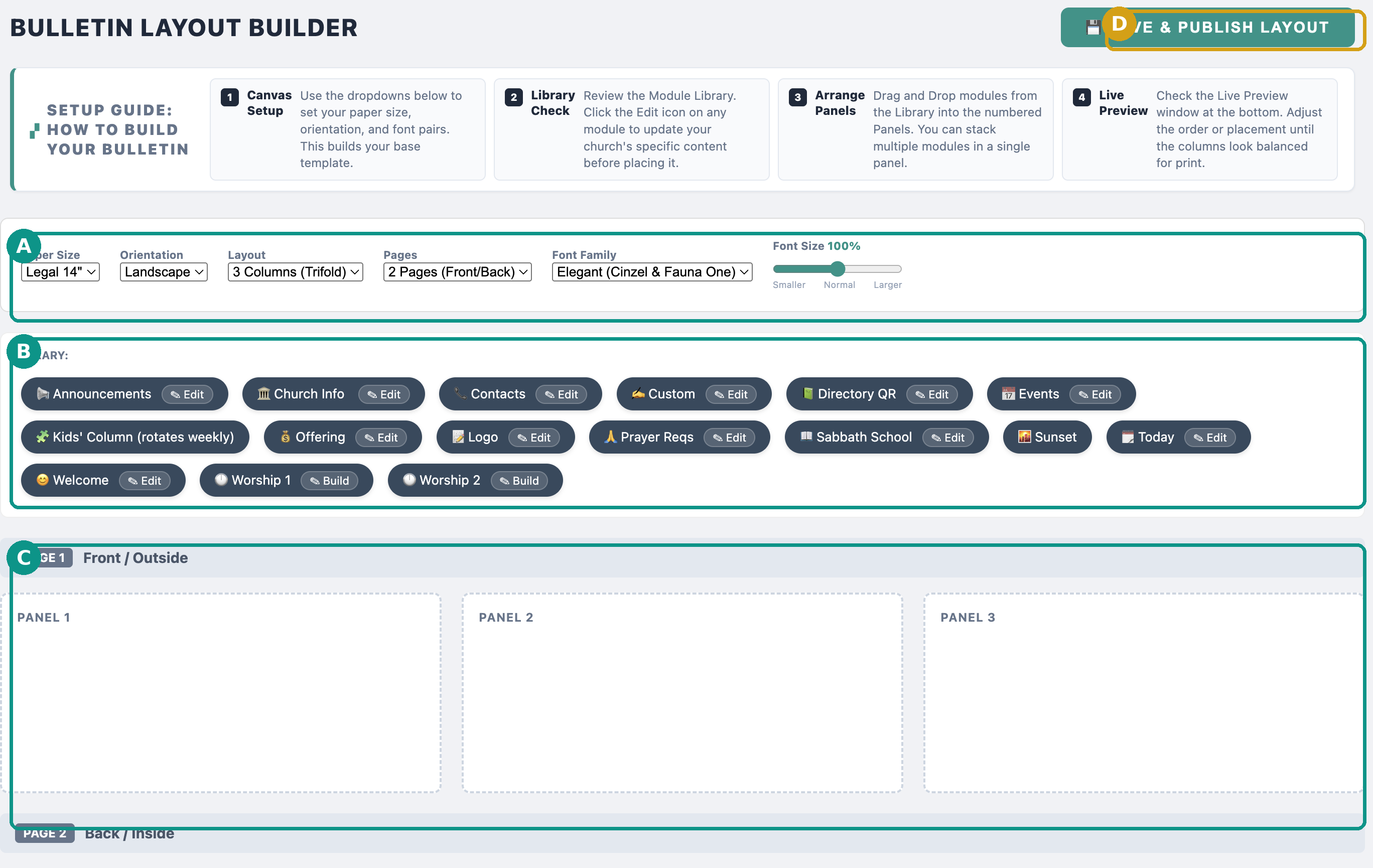
Set up your canvas (A)
Use the dropdowns to build your base template:
- Paper Size — most churches use Legal 14" for a roomy trifold, or Letter for a compact one.
- Orientation — choose Landscape for a folded trifold.
- Layout — 3 Columns (Trifold) is the classic Adventist bulletin.
- Pages — 2 Pages (Front/Back) gives you an outside and inside.
- Font Family — a pairing like Elegant (Cinzel & Fauna One) sets headings and body text.
- Font Size — nudge the slider larger for congregations with elderly members.
Review & edit your modules (B)
The Module Library holds every content block you can place. Click Edit on a module to enter your church's specific details before you place it. Common modules:
- Welcome, Church Info, Contacts — your greeting and how to reach the church.
- Worship 1 / Worship 2 — the order of service (this is what the speaker form fills each week).
- Announcements, Events, Prayer Reqs — the week's news.
- Sabbath School, Offering, Sunset, Today — the recurring details, pulled in automatically.
- Kids' Column — a children's activity that rotates weekly.
- Directory QR, Logo, Custom — branding and anything else you need.
Arrange the panels (C)
Drag modules from the library into the numbered Panels. You can stack several modules in one panel. A typical trifold:
- Front/Outside — Panel 1: Announcements & Sunset; Panel 2: the order of worship; Panel 3: cover (Logo, Welcome, Directory QR).
- Back/Inside — Church Info, Contacts, Sabbath School, Events, Kids' Column.
Check the live preview
Scroll to the Live Preview at the bottom. Adjust the order and placement of modules until the three columns look balanced for print — no half-empty panels, no overflowing ones.
Save & Publish (D)
Click Save & Publish Layout. That's the one-time setup done. From now on you never rebuild from scratch.
What happens each week
Once your layout is published, the weekly rhythm is automatic: your scheduled speaker gets a reminder and submits their sermon title, hymns, and scripture through the speaker form; Sabbath Stream drops those into the worship module, pulls in sunset times and the rotating kids' column, and builds the finished bulletin — typically ready by Wednesday. You then print it, download the PDF, or email it to the whole congregation with one click.
Best-practice tips
- Legal-size landscape, 3-column trifold is the most familiar format for Adventist congregations.
- Put a Directory QR on the cover so visitors and members can join the church directory instantly.
- Bump the font size one notch if you have many elderly members.
- Build the layout with a volunteer once; after that the clerk only reviews, not rebuilds.